Source documents
See where every document from a knowledge source stands against the source and whether the assistant can actually answer from it.
A knowledge source is copied into the workspace knowledge base ahead of time, so "the source has 200 documents" and "the assistant can answer from 200 documents" are two different facts. The Documents tab on a source is where you compare them: every document the knowledge base knows about, scored on two independent axes — where it stands against the source, and whether it is in the knowledge base and answering.
The Sync history tab beside it answers what did that run do. This tab answers where does this source stand right now.
Prerequisites
- The manage knowledge sources workspace permission — owners and admins have it.
- A knowledge source that has been synced at least once. A source that has never completed a run has nothing to compare.
Open the tab
From Admin → Knowledge Sources, open a source's … menu and choose Settings & sync history. The page opens on Documents.
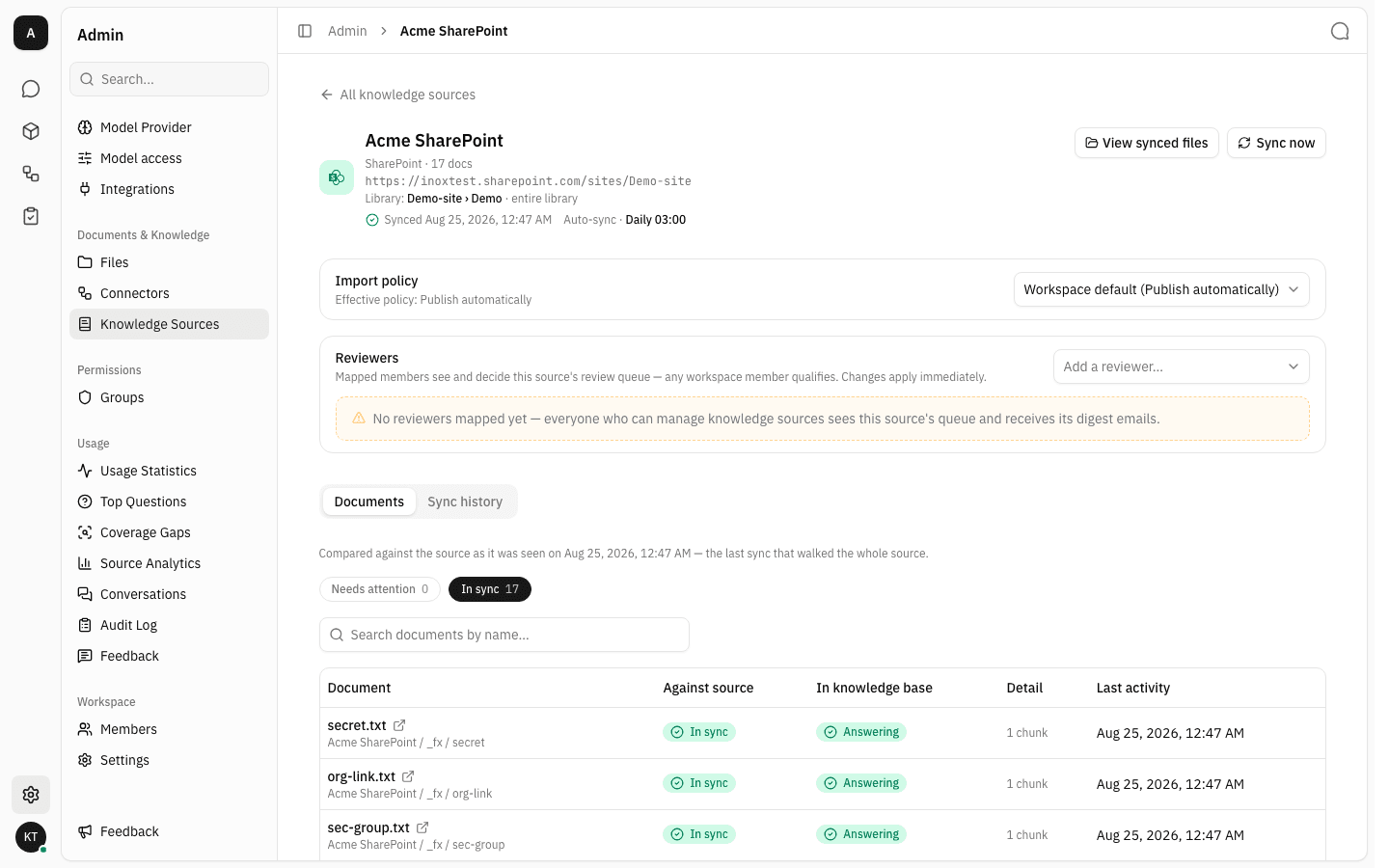
The line above the filters names the sync this comparison is based on — "Compared against the source as it was seen on …". Everything below it is the truth as of that run, not a live read of the source.
Each row has five columns:
| Column | What it tells you |
|---|---|
| Document | The document's name, a link out to it at the source, and underneath, the folder it landed in — click that to open the folder in Files. |
| Against source | Where this document stands versus the source, as of the last sync. |
| In knowledge base | Whether the assistant can answer from it right now. |
| Detail | The one-line "why" when there is one — an error message, a chunk count, the stage it is stuck at. |
| Last activity | The most recent thing that happened to this document. |
Read the two axes
The two axes move independently, and that is the point of showing both. A document can be perfectly up to date with the source and still answer nothing, because indexing failed. A document can be behind the source and still be answering, because the version already in the knowledge base keeps serving while a newer one waits for approval.
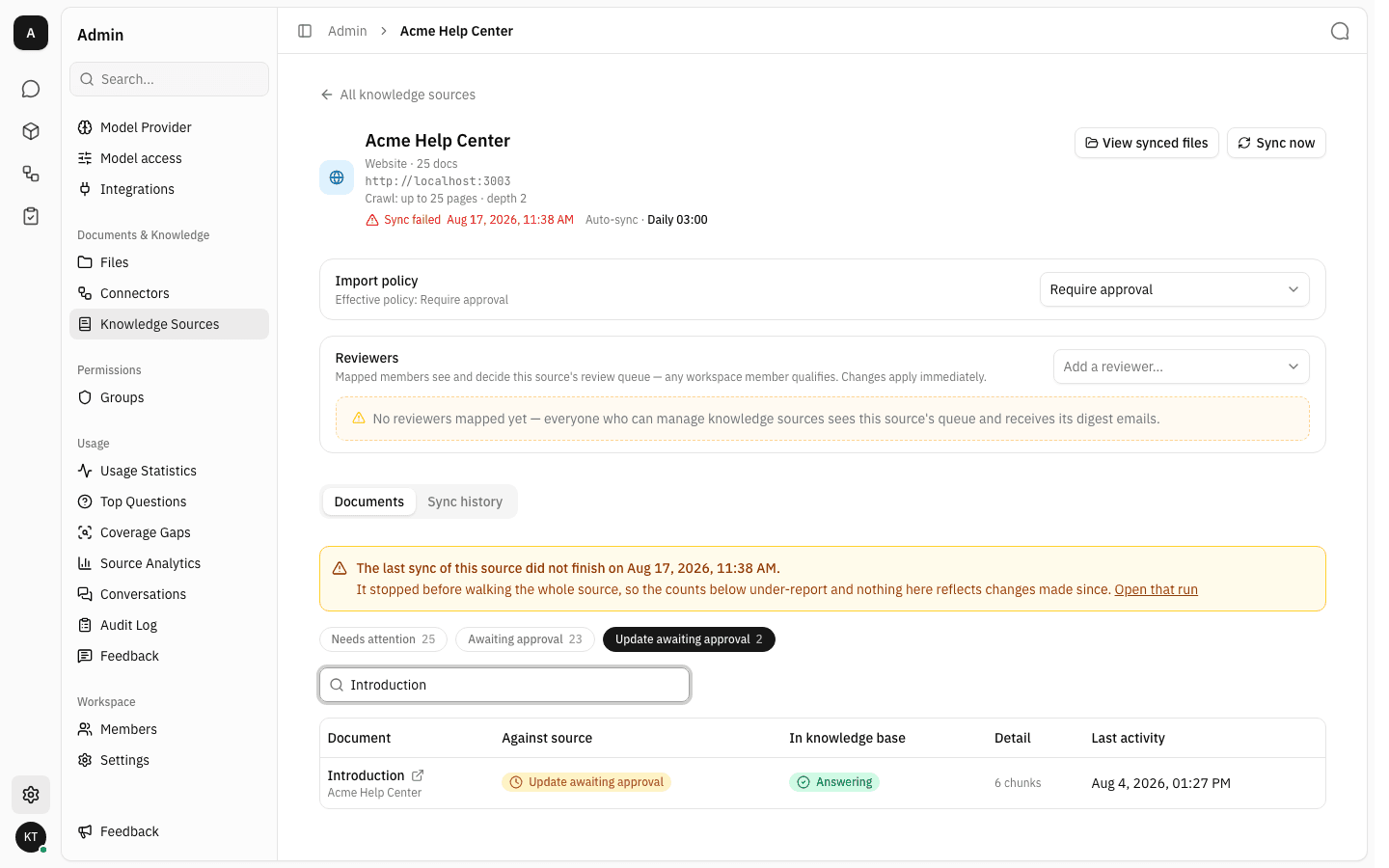
The row above says both things at once: Update awaiting approval against the source, Answering in the knowledge base. Nothing is broken — the assistant is still using the approved version while the newer one sits in the review queue.
Against source
| State | Meaning |
|---|---|
| In sync | The knowledge base holds the version the last sync saw. Nothing is waiting. |
| Awaiting approval | A document that has never been imported, waiting for a first decision in the review queue. |
| Update awaiting approval | A newer version is held for approval. The version already imported keeps answering in the meantime. |
| Rejected | A reviewer declined the first import, so the document was never brought in. |
| Update rejected | A reviewer declined the newest version, so the knowledge base deliberately serves the older one until the source changes again. |
| Importing | Approved; the content is on its way in. |
| Import failed | Approved, but fetching or storing the content failed. Detail carries the reason. |
| Nothing to import | Approved, but the document carried no readable text. A finished outcome, not an error. |
| Sync failed | The last run that reported on this document could not fetch it at all. |
In knowledge base
| State | Meaning |
|---|---|
| Answering | Indexed and retrievable. Detail shows how many chunks it produced. |
| Indexing | In the extraction and indexing pipeline. Detail names the stage. |
| Indexing failed | The file is stored but produced nothing searchable, so it answers nothing. |
| Not indexed | Indexing was never attempted, or was cancelled. |
| Not in knowledge base | There is nothing to index — a document awaiting a first decision, a rejected one, or one that never arrived. |
Filter with the chips
The tab opens on Needs attention — every document that is neither In sync nor Answering. It is the working list: the shortest set of documents where something is actually pending.
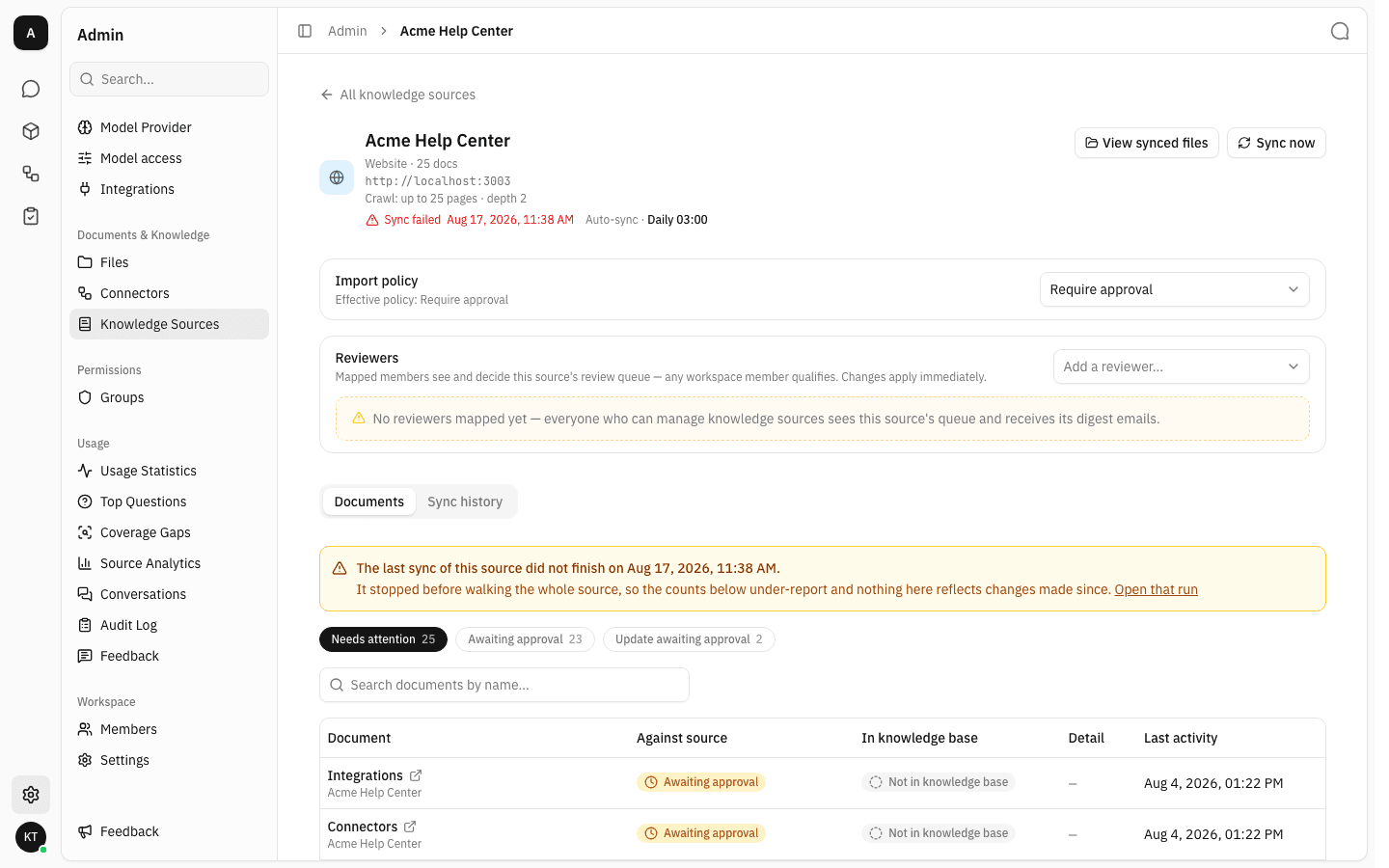
Beside it sits one chip per state that has documents, in escalating order of urgency, each with its own count. Only states with something in them appear, so the chip row is itself a summary of the source's health.
On a source where everything landed cleanly, Needs attention reads 0 and its list is empty — that is the healthy result, not a missing view.
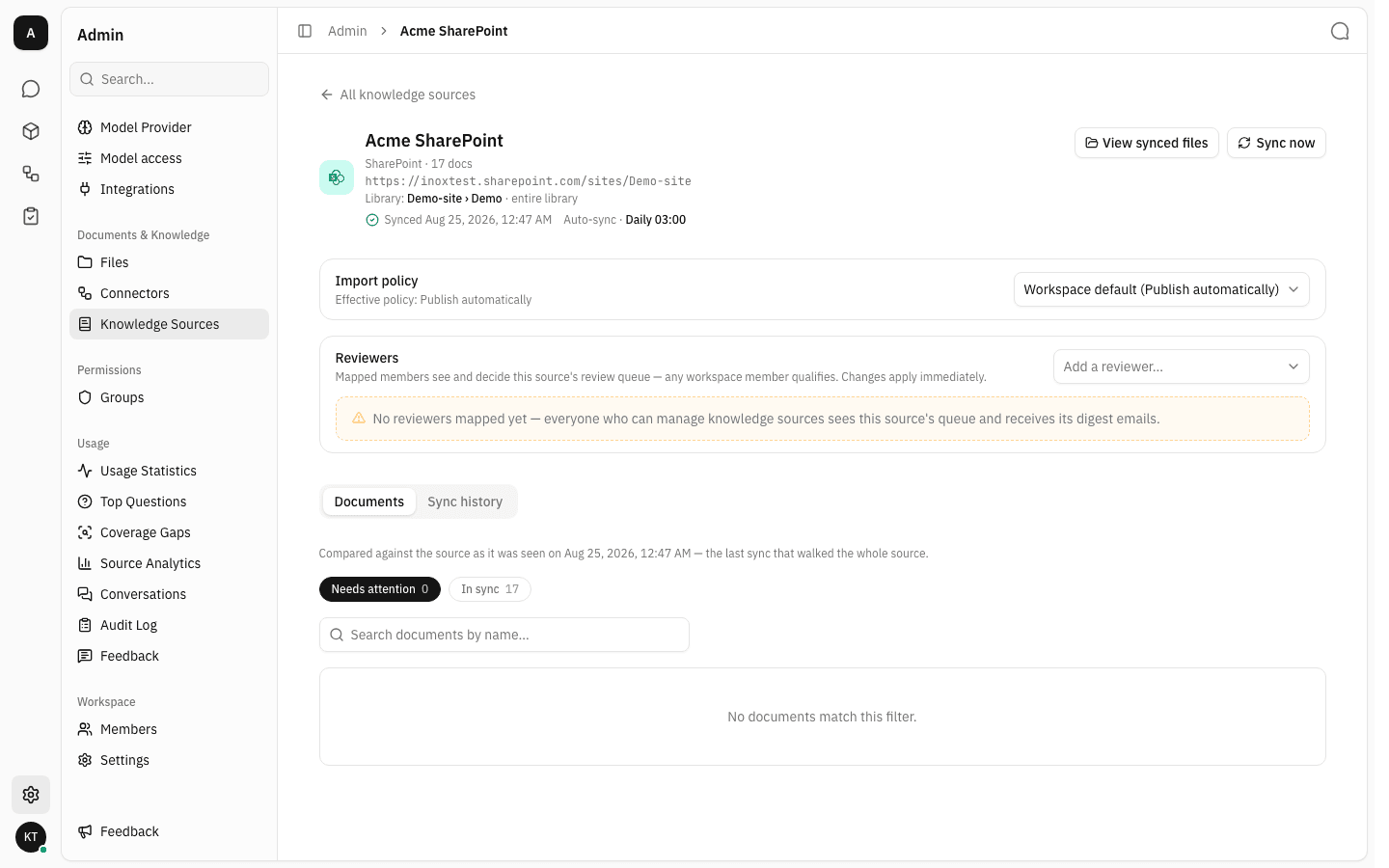
In sync is deliberately reachable as a chip too. A list that only ever showed exceptions could not tell a healthy document apart from one that never arrived — both would simply be missing from it.
Find one document
The search box filters by document name within whichever chip is selected. When nothing matches, the tab says so in the source's own terms.
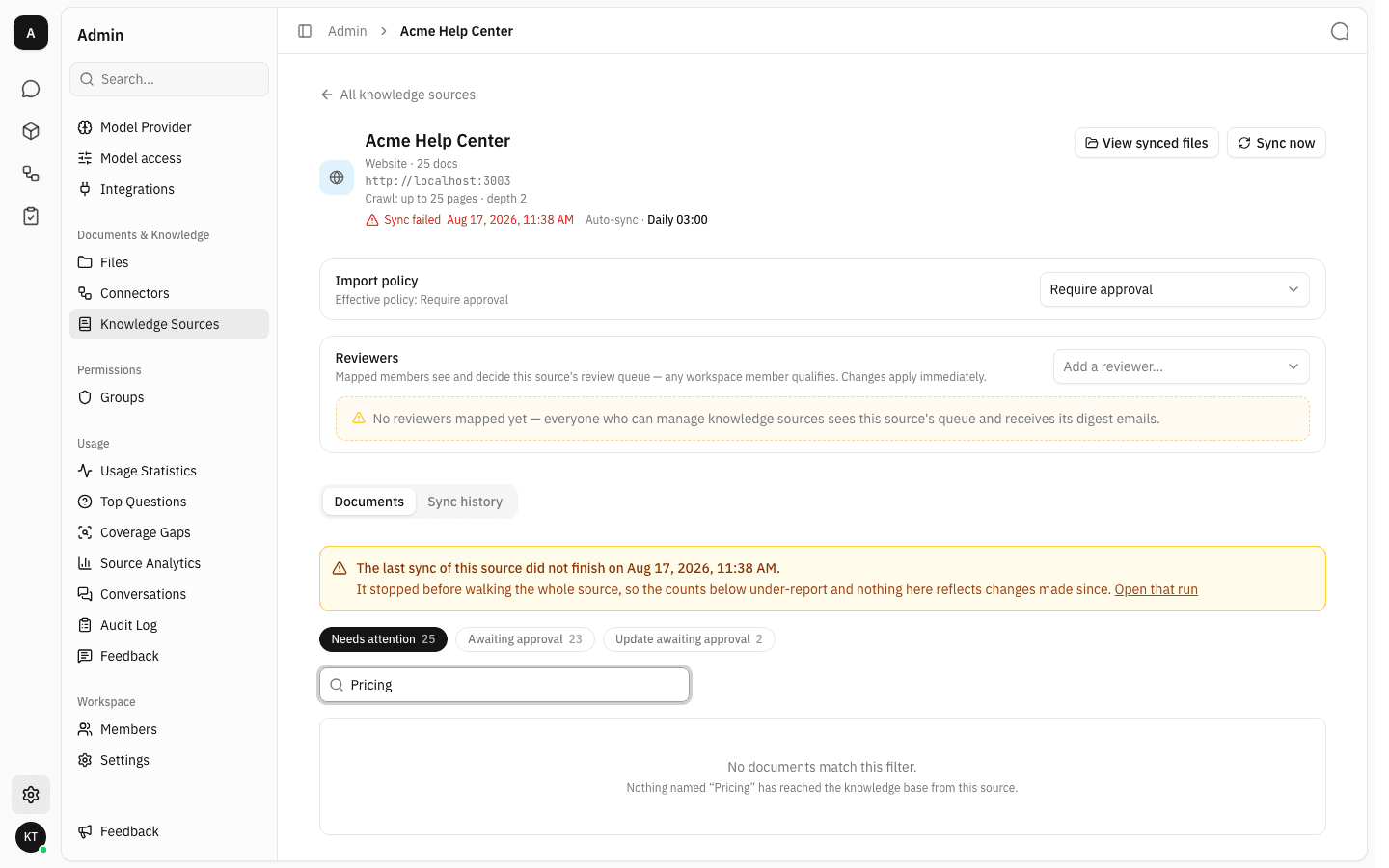
That message is worth reading carefully: it means the knowledge base has never received a document by that name from this source. The document may well exist at the source — it just never made it in.
When the counts cannot be trusted
Every count here is only as complete as the last sync that walked the whole source. When the most recent run stopped short, the tab says so in an amber banner above the filters, with a link to the run that stalled.
You can see it on the source in the screenshot above: the run stopped before finishing, so documents past that point were never examined and the counts under-report. Fix whatever failed, sync again, and the banner clears once a run walks the source end to end.
A source that has never completed a full walk shows a quieter version of the same warning — this is a partial picture.
Notes
- This tab is read-only. Approving, rejecting and retrying happen in the Review queue, so a review round keeps one entry point.
- Documents whose sync failed outright are pinned to the top of the list rather than paged in with the rest — they may have no imported version to sort by at all.
- Last activity is a different fact per state: for a settled document it is when a sync last confirmed it against the source, for a pending one when it entered review, for a failed one when it failed. That is why the column is not called "updated".
- A document that has not been seen for a long time has dropped out of recent syncs rather than being quietly stable — every sync stamps the documents it confirmed, changed or not.
- Long lists page in 25 at a time; Load more appears underneath when there is more to show.